v1.0.4 — 17 Skills · 6 Agents

Supercharge Claude Code
with One Command

Production-ready skills and AI agents for Claude Code. Install via interactive TUI — select what you need, skip what you don't.

Terminal
View CLI Docs
17Skills
6Agents
1Command
MITLicense

Everything You Need to
Level Up Claude Code

Production patterns, best practices, and specialized agents — all installable in seconds.

One Command Install

Run npx gin-skills and use the interactive TUI to pick exactly what you need. No config files.

Interactive TUI

Space to select, A to toggle all, Enter to confirm. Visual selection interface right in your terminal.

Domain Skills

14 specialized skills covering React Query, MongoDB, NestJS, security scanning, UI/UX design, and more.

AI Agents

6 specialized subagents — developer, tester, code reviewer, security scanner — each with their own toolset.

Upgrade & Uninstall

Full lifecycle: upgrade to latest, uninstall what you don't need, status to check.

Global or Per-Project

Install globally with -g for all projects, or per-project with -t path for team setups.

17 Production-Ready Skills

Deep domain knowledge that Claude Code loads automatically when relevant. Click to copy the install command.

6 Specialized AI Agents

Subagents with restricted toolsets, each focused on a specific engineering discipline.

Create Custom Skills
for Your Project

Every project is different. Use the ai-build-ai skill to generate tailor-made Claude Code skills that match your exact stack, patterns, and requirements — fully autonomous.

1

Launch Claude in autonomous mode

Start Claude Code with full permissions so it can research, create files, and build your skill end-to-end.

$ claude --dangerously-skip-permissions
2

Prompt AI to create your skill

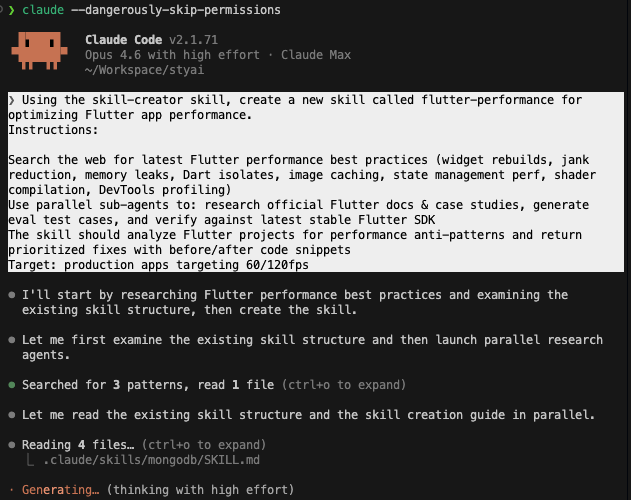
Tell Claude what skill you need. It uses ai-build-ai to research best practices, generate the SKILL.md, docs, and eval tests automatically.

> Using the ai-build-ai skill, create a new skill called flutter-performance for optimizing Flutter app performance...
Install ai-build-ai
Claude Code creating a custom flutter-performance skill using ai-build-ai, showing research, file reading, and skill generation in progress
ai-build-ai in action

Complete Command Reference

Every command, flag, and option available in gin-skills.

Interactive Install (Recommended)

default
# Launch interactive TUI — Space to select, A to toggle all, Enter to confirm
$ npx gin-skills

Install Specific Skills

--skills
# Install one or more skills by name (comma-separated)
$ npx gin-skills --skills react-query,mongodb
 
# Install a single skill
$ npx gin-skills --skills security-scanner

Install Specific Agents

--agents
# Install one or more agents by name (comma-separated)
$ npx gin-skills --agents developer,tester
 
# Install a single agent
$ npx gin-skills --agents security-scanner

Install Everything

--all
# Install all skills + all agents, no prompts
$ npx gin-skills --all

Install Globally

-g
# Install to ~/.claude (available in all projects)
$ npx gin-skills -g
 
# Install everything globally
$ npx gin-skills --all -g

Install to Specific Project

-t
# Install to a specific project directory
$ npx gin-skills -t /path/to/project
 
# Install specific skills to a project
$ npx gin-skills --skills react-query -t /path/to/project

Mix Skills + Agents

# Install specific skills AND agents in one command
$ npx gin-skills --skills react-query,mongodb --agents developer,tester

Interactive Upgrade

recommended
# Choose which installed skills/agents to upgrade
$ npx gin-skills@latest upgrade

Upgrade Everything

--all
# Upgrade all installed skills + agents to latest version
$ npx gin-skills@latest upgrade --all

Upgrade in Specific Project

# Upgrade all in a specific project
$ npx gin-skills@latest upgrade --all -t /path/to/project

Upgrade Global Install

# Upgrade globally installed skills/agents
$ npx gin-skills@latest upgrade --all -g

Interactive Uninstall

recommended
# Choose which skills/agents to remove
$ npx gin-skills uninstall

Uninstall from Specific Project

# Remove skills/agents from a specific project
$ npx gin-skills uninstall -t /path/to/project

Uninstall Global

# Remove globally installed skills/agents
$ npx gin-skills uninstall -g

Manual Removal

# Skills and agents are plain directories — you can also delete manually
$ rm -rf .claude/skills/react-query   # remove a skill
$ rm .claude/agents/developer.md   # remove an agent

Status

alias: info
# Show which skills/agents are installed vs available
$ npx gin-skills status
 
# Check status for a specific project
$ npx gin-skills status -t /path/to/project
 
# Check global status
$ npx gin-skills status -g

List

alias: ls
# List all skills and agents bundled in this package
$ npx gin-skills list

Versions

alias: ver
# Show all published versions on npm registry
$ npx gin-skills versions

Global Flags

all commands
FlagShortDescription
--global-gTarget ~/.claude/ (available in all projects)
--target <path>-tTarget a specific project directory
--allSkip interactive prompts, apply to everything
--skills <list>Comma-separated skill names to install
--agents <list>Comma-separated agent names to install
--version-VPrint CLI version
--help-hPrint help for any command

All Commands Summary

CommandAliasDescription
(default)installInstall skills and/or agents
upgradeRe-copy installed skills/agents from latest version
uninstallremoveRemove installed skills/agents
statusinfoShow installed vs available
listlsList all bundled skills and agents
versionsverShow all published npm versions

Ready to Supercharge
Your Workflow?

One command. 17 skills. 6 agents. Zero configuration.

$ npx gin-skills Click to copy

Built on Open Source

GinStudio Skills includes community-driven skills. Credit to the original authors.

U

ui-ux-pro-max

by Next Level Builder · MIT License
AI-powered design intelligence with 67 UI styles, 96 color palettes, 57 font pairings, and 100 industry-specific reasoning rules. Supports 13 tech stacks including React, Next.js, Vue, SwiftUI, Flutter, and more.
67 Styles 96 Palettes 57 Fonts 13 Stacks 38k Stars